Best Embedding Models in 2026
OpenRouter ·
An embedding model decides what your retrieval system can find. It turns each input into a vector and places related inputs near one another, so your application can retrieve by meaning instead of exact wording.
The best choice depends on the material you need to search. An English knowledge base, a multilingual support archive, a source-code repository, and a text-and-image collection have different requirements. Vector size, context length, public weights, and price can also change the decision.
We shortlisted models for English RAG, multilingual retrieval, code search, text-and-image retrieval, and low-cost indexing, then sent live requests to each one through our embeddings endpoint.
Last verified: 11 September 2026. Our embedding model catalog returned 37 entries on that date, including batch and preview variants of some models.
Providers can add or remove routes, and prompt prices can change. Check the current model page before starting a large indexing or re-indexing job. If the model page differs from this guide, use the model page.
TL;DR
- Start with
openai/text-embedding-3-smallfor English RAG. - Test
voyageai/voyage-4-largewhen your inputs exceed 8,192 tokens or you want to move between Voyage 4 tiers without rebuilding the index.qwen/qwen3-embedding-8bhas a longer context window at a lower prompt price if you want an open-weight alternative. - Use
qwen/qwen3-embedding-8bfor multilingual retrieval with public weights,voyageai/voyage-code-4for code search, andgoogle/gemini-embedding-2orvoyageai/voyage-multimodal-3.5for text-and-image retrieval. perplexity/pplx-embed-v1-0.6bhas the lowest prompt price among the paid text models in our shortlist.nvidia/nemotron-3-embed-1b:freeis a free text-embedding route with a 32,768-token context window.- Our API checks confirm request and response behavior, not retrieval quality. Compare at least two candidates on labeled queries and documents from your application before building or rebuilding the full index.
Best embedding models by use case
| Use case | Recommended model | Why it is on the shortlist |
|---|---|---|
| Default English RAG | openai/text-embedding-3-small | Low prompt price, 8,192-token context, and adjustable output dimensions |
| Inputs longer than 8,192 tokens | voyageai/voyage-4-large | 32,000-token context, four selectable dimensions, and embeddings compatible with the other Voyage 4 tiers |
| Multilingual retrieval with public weights | qwen/qwen3-embedding-8b | Support for more than 100 languages, a 32,768-token context window, and public weights |
| Code search | voyageai/voyage-code-4 | Built for retrieving code and related technical content |
| Text-and-image retrieval | google/gemini-embedding-2 | Places text and images in the same embedding space. voyageai/voyage-multimodal-3.5 is the second option we verified |
| Lowest-priced paid text option | perplexity/pplx-embed-v1-0.6b | Prompt price of $0.004 per million input tokens with a 32,000-token context window |
| Free text embeddings | nvidia/nemotron-3-embed-1b:free | A free route with a 32,768-token context window and a multilingual model card |
Choose a model by input type
Start with the material you need to search. The chart sorts by input type first, then by whether you need public weights, then by your main constraint.
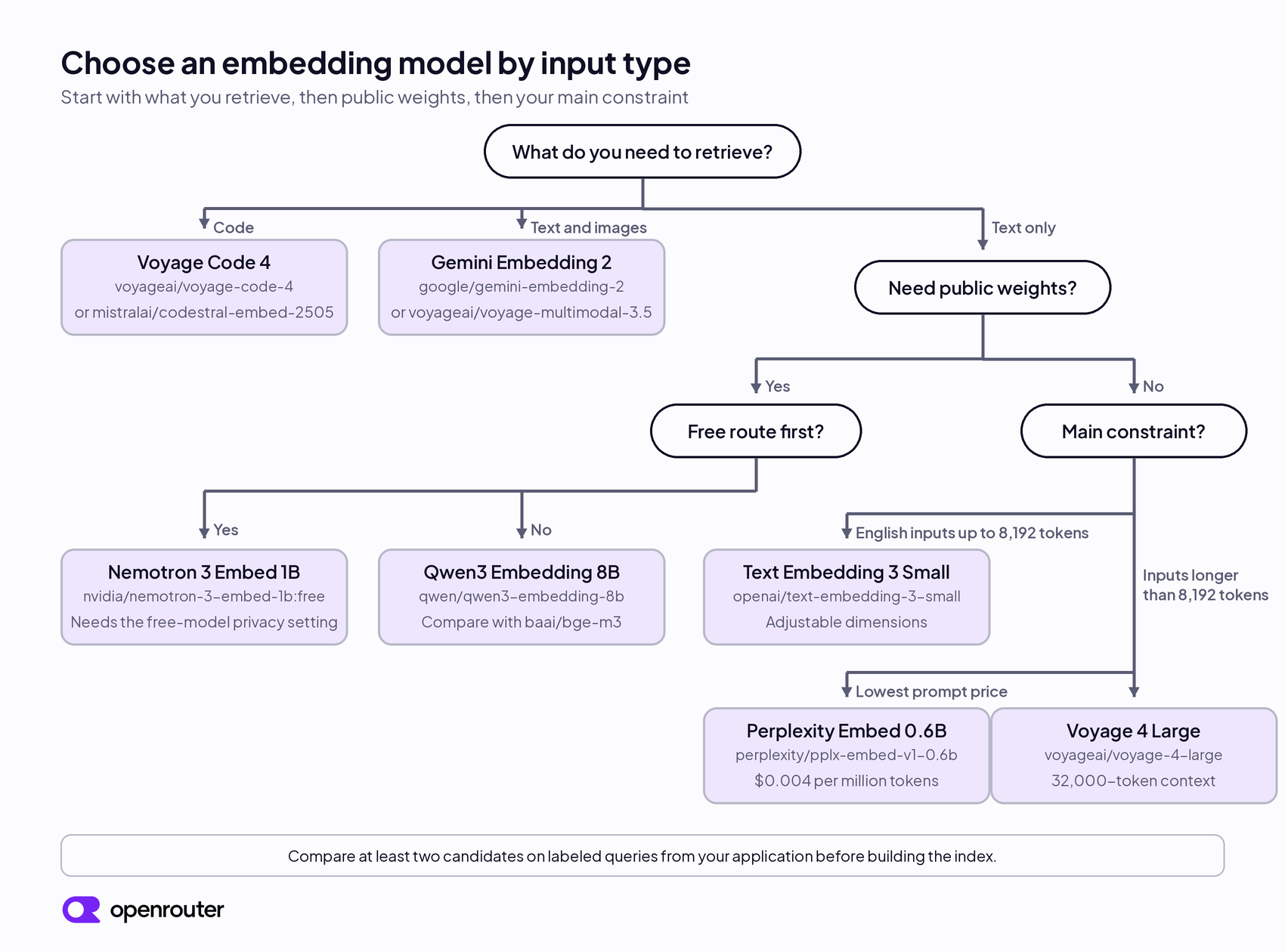
The chart gives you a starting point. Compare at least two candidates with queries and documents from your application, and track how often each model retrieves the relevant chunks before you build or rebuild a large index.
How we chose these models
We used our live catalog to confirm availability, context windows, input types, and prompt prices. We checked the model providers’ documentation for capabilities and benchmark results, then sent live requests through our embeddings endpoint to confirm request and response behavior.
We sent a two-string batch request to 19 models and ran 28 checks in total, covering batch input, configurable dimensions, image input, text-and-image input, and error handling. The 16 paid models returned one vector per input. The responses confirmed the default dimensions in the table below and showed that the dimensions parameter works with OpenAI Text Embedding 3 Small, Gemini Embedding 2, and Voyage 4 Large. A request for a model that does not exist returned a 400 error with the message Model openai/does-not-exist does not exist.
The three free routes returned a 404 error from our test account because its privacy settings do not allow routing to providers that may train on free-model prompts. We describe that setting in the free options section below. The default dimensions we list for those models come from their model cards, not from our responses.
These requests confirmed API compatibility. They did not measure retrieval quality. We excluded response times because each model received one small request under different serving conditions. We matched each use case to a documented capability, then used language coverage, context length, output dimensions, public weights, and prompt price to narrow the candidates. Published evaluations, including MTEB and CoIR, helped us identify models to test. Your labeled retrieval results should decide which one you deploy.
Compare the shortlisted embedding models
The prices below are the prompt prices listed in our catalog on 11 September 2026, and the image price for Gemini Embedding 2 is the catalog value on 18 September 2026. The default dimensions come from our live responses, except for the free NVIDIA model, whose default comes from its model card.
| Model | Input | Context | Default dimensions | Prompt price per million tokens | Weights |
|---|---|---|---|---|---|
openai/text-embedding-3-small | Text | 8,192 | 1,536 | $0.02 | Closed |
openai/text-embedding-3-large | Text | 8,192 | 3,072 | $0.13 | Closed |
voyageai/voyage-4-lite | Text | 32,000 | 1,024 | $0.02 | Closed |
voyageai/voyage-4 | Text | 32,000 | 1,024 | $0.06 | Closed |
voyageai/voyage-4-large | Text | 32,000 | 1,024 | $0.12 | Closed |
voyageai/voyage-code-4 | Text, optimized for code | 32,000 | 1,024 | $0.12 | Closed |
voyageai/voyage-multimodal-3.5 | Text and image | 32,000 | 1,024 | $0.12 | Closed |
qwen/qwen3-embedding-8b | Text | 32,768 | 4,096 | $0.01 | Open |
qwen/qwen3-embedding-4b | Text | 32,768 | 2,560 | $0.02 | Open |
perplexity/pplx-embed-v1-0.6b | Text | 32,000 | 1,024 | $0.004 | Open |
perplexity/pplx-embed-v1-4b | Text | 32,000 | 2,560 | $0.03 | Open |
google/gemini-embedding-2 | Text and image | 8,192 | 3,072 | $0.20 for text, $0.45 for image tokens | Closed |
nvidia/nemotron-3-embed-1b:free | Text | 32,768 | 2,048 | Free | Open |
The dimensions column affects raw index size. See “Calculate vector storage” below for the formula and examples.
Our catalog contains more models than the table shows. baai/bge-m3 adds another open multilingual option, mistralai/mistral-embed-2312 provides a general text alternative, and mistralai/codestral-embed-2505 targets code retrieval. All three returned vectors in our text request check. The catalog also lists a set of 512-token open models from BAAI, E5, GTE, and Sentence Transformers at $0.005 to $0.01 per million tokens, which we did not test for this guide.
Best default for English RAG
Start with openai/text-embedding-3-small when you need a managed model for an English knowledge base. Its default vector has 1,536 values, half as many as the default from openai/text-embedding-3-large. With the same numeric format, Small uses half as much raw vector storage. Keep the 1,536-value default for the first evaluation and reduce it only if the default meets the retrieval target but storage or search cost remains a constraint.
You can shorten its vectors with the dimensions parameter. Our request with "dimensions": 256 returned a vector with 256 values. Smaller vectors use less database storage and reduce the work required for similarity search, but they can also reduce retrieval quality. Test the smaller size before changing an existing index.
OpenAI describes text-embedding-3-large as its most capable embedding model for English and non-English tasks. Test it when Small misses relevant results, particularly when users search across languages. Moving to Large changes the vector size and prompt price, so compare both models on held-out questions before re-embedding the corpus.
If your inputs exceed Small’s 8,192-token limit, test Voyage 4 Large. For shorter inputs, compare both models using the same chunks, queries, and relevance labels.
Voyage 4 family for longer inputs
Test voyageai/voyage-4-large when you need a managed 32,000-token model with adjustable dimensions and compatibility across Voyage 4 tiers. It accepts up to 32,000 tokens and supports 256, 512, 1,024, and 2,048 dimensions. In our API check, setting dimensions to 512 returned a vector with 512 values.
The family includes voyageai/voyage-4 and voyageai/voyage-4-lite, which use the same context window. Voyage states that all embeddings created with the 4 series are compatible with each other. This lets you test another Voyage 4 tier against an existing index. Validate a tier change on a representative sample before deployment. A compatible vector space removes the rebuild requirement, but it does not guarantee identical retrieval results.
Run Large and at least one lower Voyage 4 tier against the same evaluation set. If they retrieve the same relevant passages at the same cutoff, the lower tier may meet your requirements.
The Voyage models are managed services. If you need public weights for self-hosting or deployment control, Qwen3 Embedding 8B is the open-weight alternative in this shortlist.
Best open-weight model for multilingual retrieval
qwen/qwen3-embedding-8b is our open-weight multilingual choice. It supports more than 100 languages, and you can download the weights from Hugging Face or call the hosted model through our API. Our default API request returned 4,096 values. With the same numeric format, a 4,096-value vector uses four times the raw storage of a 1,024-value vector. Include that difference when estimating index size. Our API checks do not establish whether Qwen3 Embedding 8B retrieves better than nvidia/nemotron-3-embed-1b:free. When route cost and vector size affect the decision, test both on the same labeled set before you commit.
The Qwen model card reports a multilingual score of 70.58 on the Massive Text Embedding Benchmark, MTEB, as of 5 June 2025. This is a vendor-reported public benchmark result. Use it to shortlist Qwen, then test every language and domain your application supports, because your corpus can produce a different ranking.
The model page lists a 32,768-token context window, but the limit is set per endpoint. On 11 September 2026 the DeepInfra and SiliconFlow endpoints for Qwen3 Embedding 8B listed 32,768 tokens and the Nebius endpoint listed 32,000. If you send inputs longer than 32,000 tokens, check the endpoint list and pin a provider with the larger limit, or keep inputs at or under 32,000 tokens.
The 4B version uses the same model-level context window and returned 2,560 values in our check. It requires fewer resources to run yourself. Hosted prices depend on the available providers, so compare the current model pages for Qwen3 Embedding 8B and 4B before choosing.
baai/bge-m3 gives you a second open multilingual model to compare with Qwen3 on your own dataset. Its model card covers more than 100 languages and inputs of up to 8,192 tokens, and our request returned a 1,024-value vector. The upstream model can return several representation types, including dense vectors and sparse vectors. Our standard embeddings response returns the dense vector. Use the upstream implementation if your retrieval design depends on its other representation types.
Best embedding models for code search
Use voyageai/voyage-code-4 when a query needs to retrieve a function, file, or piece of code documentation. Voyage built the model for code retrieval and coding-agent workloads. Its 32,000-token context window can accept long files or queries, although the index chunks should still represent code units that are useful when retrieved.
mistralai/codestral-embed-2505 is the main code-specific alternative in our catalog. It returned 1,536 values in our text request check. Its context window is 8,192 tokens, against 32,000 for Voyage Code 4. Test Voyage Code 4 first and use Codestral Embed as the comparison model.
Public evaluations can help you compare the candidates. The Code Information Retrieval Benchmark, CoIR, contains ten datasets covering eight code-retrieval tasks across seven domains. Use it to compare models before testing the strongest candidates on work from your own repositories. One useful internal evaluation maps issue descriptions or developer questions to the files and chunks needed to resolve them.
Best models for text-and-image retrieval
Use google/gemini-embedding-2 when the same index needs to search text and images. It places both input types in one embedding space, so a text query can retrieve an image with related meaning and an image query can retrieve related text.
We verified text, base64-encoded PNG image, and combined text-and-image requests through our embeddings endpoint. Each request returned one vector with 3,072 values. We also sent a text request with "dimensions": 768 and received a vector with 768 values. In our check, a 64 by 64 pixel PNG counted as 258 prompt tokens and cost $0.000128. Our catalog prices image input for this model separately, at $0.45 per million image tokens on the model page as of 18 September 2026, so check the model page before indexing a large image collection. This guide limits the recommendation to text and image inputs because those are the request types we verified.
voyageai/voyage-multimodal-3.5 is the second text-and-image model we verified. Its image request and its combined text-and-image request each returned a vector with 1,024 values, and the same 64 by 64 pixel PNG counted as 89 prompt tokens and cost $0.00003. It has a 32,000-token context window and a prompt price of $0.12 per million tokens. Gemini Embedding 2 and Voyage Multimodal 3.5 use different vector spaces, so choose one before you index.
google/gemini-embedding-001 is a separate text-only model with a 20,000-token context window. The two Gemini models use different vector spaces, so changing between them requires you to re-embed the index.
nvidia/llama-nemotron-embed-vl-1b-v2:free is a free text-and-image route with a 131,072-token context window in our catalog. Our test account could not call it for the privacy-setting reason described below, so we left it out of the recommendation.
Best low-cost and free options
perplexity/pplx-embed-v1-0.6b has the lowest paid text price in our shortlist at $0.004 per million input tokens. It accepts up to 32,000 tokens and returned a vector with 1,024 values. The larger perplexity/pplx-embed-v1-4b returned 2,560 values and has a prompt price of $0.03 per million input tokens.
Perplexity positions the 0.6B model for lightweight, low-latency retrieval and the 4B model for higher retrieval quality. Our API checks confirmed the default vector sizes, not which Perplexity model retrieves better. Treat the provider’s positioning as a shortlist signal and compare both models on labeled queries.
Use a free route for evaluation, not as the only path for a large production indexing job. Start with nvidia/nemotron-3-embed-1b:free when you need a free candidate to test. It has a 32,768-token context window, and NVIDIA’s model card reports a 2,048-value output vector, evaluation across 34 languages, and support for slicing the vector to a smaller size with L2 re-normalization. NVIDIA publishes the weights under the OpenMDW-1.1 license. Check the current model page for availability and rate limits before using a free route for a production indexing job. Availability and rate limits can change during a batch.
The free routes in our catalog are served by providers whose data policy may allow training on your prompts. Your account privacy settings have separate switches for paid and free models. When the free-model switch is off, a request to one of these routes returns a 404 error that names the free model training setting and lists the excluded endpoint. Our test account has that switch off, which is why the three free routes failed our checks. A workspace guardrail that disables free-model training, or provider.data_collection set to deny on the request, excludes the same endpoints and produces the same 404 error. See provider logging and training policies for how we apply those settings.
liquid/lfm-2.5-embedding-350m:free is the other free text route in the shortlist. Its 512-token context window restricts each input to a short passage, so longer documents require smaller chunks than the other models in this guide. Use it only when each embedded passage fits within 512 tokens, such as short FAQ entries, titles, or sentence-level snippets. Exclude it when your retrieval unit needs longer context.
Evaluate embedding models on your data
Use the same corpus, queries, relevance labels, chunking, and retrieval metric for every candidate. Change the model while keeping the rest of the evaluation fixed so the results remain comparable.
Evaluate English RAG
Use the same chunking strategy for every candidate. Start with chunks of about 512 to 1,024 tokens with overlap, then adjust the size based on your document structure and retrieval results.
Begin with questions your users ask and label the chunks that contain the answer. Measure recall using the same number of retrieved chunks that your application sends to the generation model. Add normalized discounted cumulative gain, nDCG, when several chunks are relevant but some are more useful than others.
Evaluate multilingual retrieval
Include every language you plan to support. Add cross-language cases if users may write a query in one language and retrieve a document in another. Report each language separately alongside the overall average so strong results in one language do not hide weak results in another.
Evaluate code search
Use developer questions or issue descriptions and label the files or code chunks that resolve them. CoIR can supplement this set. Your repository-specific labels should carry more weight because they reflect the searches your application will run.
Calculate vector storage
Include vector storage in the comparison. One million 4,096-dimensional float32 vectors require about 16.4 GB before index overhead. One million 1,024-dimensional vectors require about 4.1 GB. You can estimate the raw storage with this formula:
vector storage in bytes = number of vectors x dimensions x bytes per valueCompare retrieval quality at each supported vector size, then choose the smallest one that meets your target. Use the selected model and dimension for both indexing and querying.
Use compatible models for indexing and queries
Vectors from different model families do not share a coordinate space. If you index documents with openai/text-embedding-3-small, embed each query with the same model and configuration. Mixing models produces unreliable retrieval results. The same rule applies to google/gemini-embedding-2 and google/gemini-embedding-001. Switching between them requires rebuilding the index.
Changing the model usually requires re-embedding the corpus. Voyage designed the Voyage 4 text models to produce compatible vectors, which creates a documented exception within that family. Test a sample before changing the query or indexing path, because the selected tier can still affect retrieval quality.
Store the model slug, output dimension, prompt format, and creation date with the index metadata. Some embedding models use an input_type value to distinguish queries, such as search_query, from indexed content, such as search_document. Store the value used for each side with the index metadata. These fields let a later deployment check its embedding configuration before querying the index.
The endpoint stays the same across our model catalog. The model slug and output dimension must match the configuration used to build the index. If you built the index with a non-default dimension, include the same dimensions value when embedding queries.
Call an embedding model through our API
Send requests to https://openrouter.ai/api/v1/embeddings. This Python example uses the same batch request shape that passed our verification:
import os

import requests

response = requests.post(
    "https://openrouter.ai/api/v1/embeddings",
    headers={
        "Authorization": f"Bearer {os.environ['OPENROUTER_API_KEY']}",
        "Content-Type": "application/json",
    },
    json={
        "model": "openai/text-embedding-3-small",
        "input": [
            "Reset a password from the account settings page.",
            "Refunds are available within 14 days of purchase.",
        ],
    },
    timeout=90,
)

response.raise_for_status()
result = response.json()
vectors = [item["embedding"] for item in result["data"]]

print(len(vectors))
print(len(vectors[0]))
The response contains one vector for each input in the same order. When the selected model supports adjustable dimensions, add "dimensions": 256 or another supported size to the request and store that value with the index metadata.
For Gemini Embedding 2 and Voyage Multimodal 3.5, place image input in a content array within the input list. We verified this request structure with both models:
payload = {
    "model": "google/gemini-embedding-2",
    "input": [
        {
            "content": [
                {"type": "text", "text": "A purple square"},
                {
                    "type": "image_url",
                    "image_url": {"url": "data:image/png;base64,BASE64_IMAGE_DATA"},
                },
            ]
        }
    ],
    "encoding_format": "float",
}
Omit the text part to embed the image alone. See our Embeddings API documentation for the full request and response schema.
FAQ
Which embedding model should I use?
Choose by the material you retrieve and the constraints that matter for deployment. Start with candidates that support your input types, language coverage, context length, and weight requirements. Compare at least two on the same labeled queries, then choose the model that meets your retrieval target at an acceptable storage and indexing cost.
Can I change embedding models without rebuilding the index?
Changing to another model family requires rebuilding the index, because documents and queries must use vectors from the same model and configuration. Voyage states that embeddings from Voyage 4 Large, Voyage 4, and Voyage 4 Lite are compatible with each other. Test retrieval quality on a sample before changing tiers.
What is the fastest embedding model?
We did not run a controlled latency benchmark for this guide. Latency changes with input length, batch size, provider load, and routing. Test the endpoints with the inputs and batch sizes your application will use.
Should I use the largest embedding dimension?
Choose the embedding dimension from your retrieval results and storage constraints. Higher dimensions require more storage and more work per similarity search. When a model supports reduced dimensions, use the smallest dimension that meets your retrieval target on your evaluation set.
Is text-embedding-ada-002 still a good default?
We would not use text-embedding-ada-002 as the default for a new OpenAI-based index. Evaluate text-embedding-3-small first, then compare it with text-embedding-3-large if your retrieval results justify the higher prompt price and larger vectors.
Why does a free embedding model return a 404 error?
The free embedding routes in our catalog are served by providers whose data policy may allow training on your prompts. If your account privacy settings, a workspace guardrail, or the provider.data_collection request field set to deny excludes providers that train on free-model prompts, no endpoint is eligible and the request returns a 404 error that names the free model training restriction. Check the privacy page of your account and any guardrail applied to the API key before you treat the model ID as invalid.