Live Web Search Benchmarks: Pick the Right Engine, Depth, and Model for Your Agent
Ayush Patel ·

Web search is table stakes for most LLM requests in order to overcome knowledge cutoffs. Labs and search providers are evolving fast to make search more effective and efficient, leaving all of us with a set of tricky decisions: take the native search some labs build in, or wire up a third-party engine like Exa, Parallel, or Perplexity? Is one search enough, and if not how long do I let the agent keep searching? Are more search turns worth the quality they buy?
We built live leaderboards to help you decide the best search configuration with data. See the data on our new Benchmarks page.
We benchmark all the combinations to find strengths and weaknesses
When setting up a search request, you have four decisions:
- Model. Writes the exact query that gets submitted to the search engine and processes the results.
- Engine. You can choose a specific engine or rely on the bundled engines offered by some labs. On OpenRouter, we offer Exa, Parallel, and Perplexity, alongside the native engines from labs like OpenAI, Anthropic, and Google.
- Search method. Either you can perform the search before calling the model and pass the results in as context, or you can equip the model with a web search tool that it calls at its discretion.
- Search budget. If you choose the search tool method, you can also give the model a budget for how many searches it’s allowed to do. This enables models to adjust the query if it doesn’t like the results or to do follow-up searches. Our runs use 1, 5, or 25 turns.
To comprehensively understand web search performance, we regularly run four benchmarks across multiple models, engines, and search configurations:
- BrowseComp: hard fact-finding that takes real browsing
- DeepSearchQA: multi-hop research questions
- WideSearch: broad “fill in the whole table” collection
- HLE: expert exam questions with search
Each page ranks configurations by quality, value, and speed, so you can make decisions on the factor most important to your workload. The leaderboards are live, so the numbers move as new runs land and new models and engines are added. Today’s leader is not guaranteed to be tomorrow’s. We won’t spend much time on today’s leaders in this post as we expect that to change over time. Instead, let’s look into what the data tells us about how to make a decision for your workload.
Search budget matters more than any other factor
Increasing the engine budget up from one turn improves quality more than any other single change you can make. To illustrate, here was our initial run of BrowseComp on Perplexity across three different budgets:
| Model, with Perplexity | 1 turn | 5 turns | 25 turns |
|---|---|---|---|
| Claude Opus 5, high | 35.8% ($0.14) | 66.5% ($0.51) | 89.0% ($0.99) |
| GPT-5.6 Sol, high | 46.3% ($0.20) | 65.2% ($0.29) | 82.4% ($0.50) |
| GPT-5.6 Luna, extra-high | 33.7% ($0.02) | 57.0% ($0.04) | 74.0% ($0.10) |
This pattern holds up across all providers we measured:
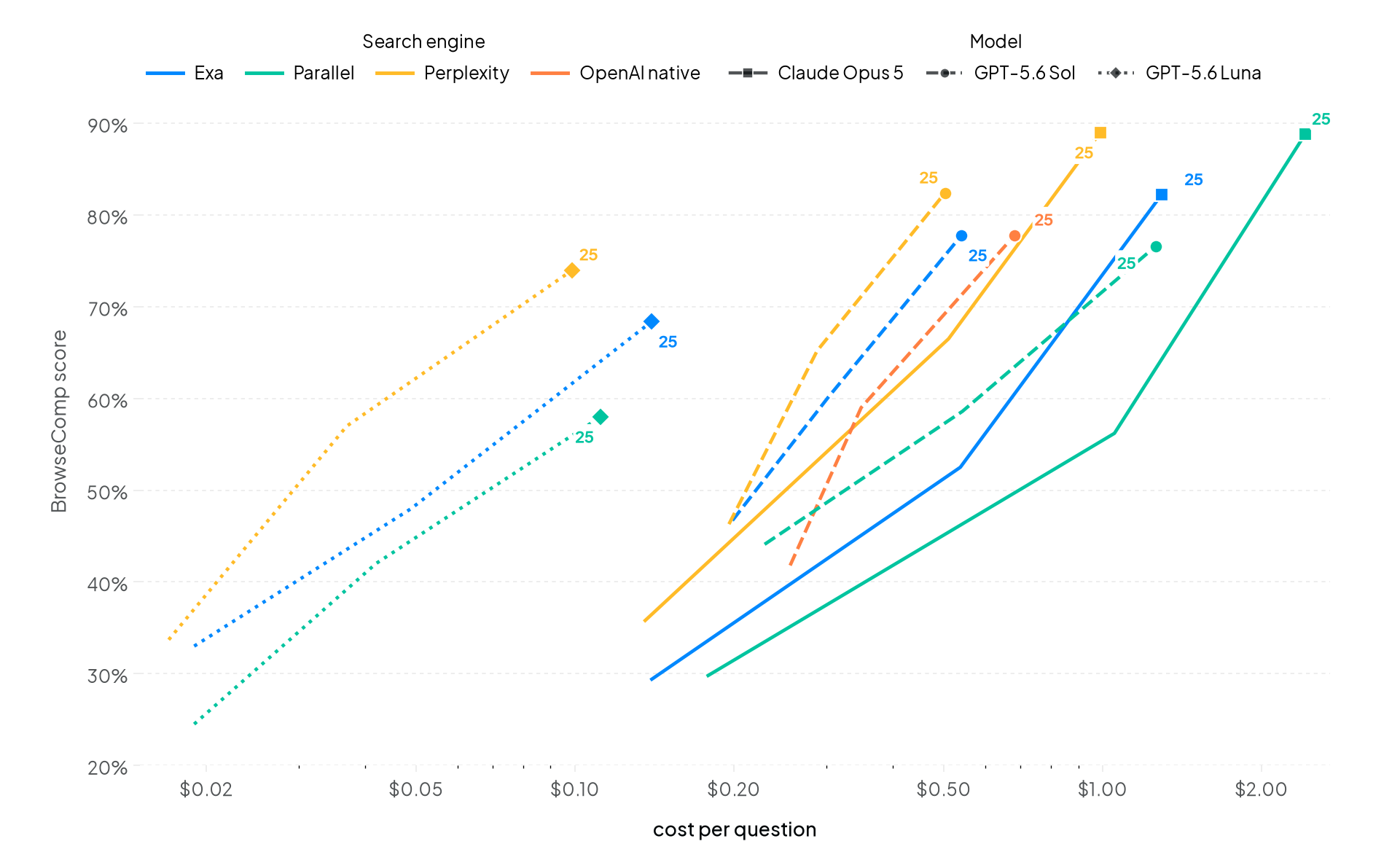
These runs cover BrowseComp only, using the server tool with ten results per search, no page fetching or code execution, and the latest qualifying run per configuration.
Increasing search depth is the cheapest way we’ve found to increase quality. Increasing from 1 turn to 25 roughly doubles the score while costing only 2.5-7 times more per question.
You may assume this universally slows down response time, but that’s not always the case. For example, Luna took 140 seconds per question at 1 turn and 111 seconds at 25. Of the 35 configurations we ran at both 1 and 5 turns, over a third were slower with fewer turns. All were OpenAI models. These models deal with the constrained search budgets with extra reasoning.
On the other hand, search depth can be detrimental to costs on easier tasks. For example, on HLE, GPT-5.6 Sol with Perplexity scored similarly between 1 turn and 25 turns, for triple the cost. If your searches tend to be simple, it may still be worth keeping your budget limited.
Your worst-case cost scenario is driven by your failure rate
The other situation where an expanded budget is detrimental is when the model is failing to find an answer. We found that models would exhaust their budget attempting to find an answer even though they would eventually fail.
| Suite (25-turn budget) | Avg searches when correct | Avg searches when incorrect |
|---|---|---|
| BrowseComp | 10.3 | 19.7 |
| DeepSearchQA | 11.7 | 20.1 |
| HLE | 5.2 | 7.5 |
| WideSearch | 17.6 | 23.4 |
The deepest attempt we recorded, 81 searches on a WideSearch table, was still graded incorrect. If your workload has a high failure rate, then reducing search depth is likely an efficient path for reducing costs.
While the engine matters, the model matters more
Once the budget is set, the next most important question is which model to use.
| Model | Perplexity | Exa | Parallel |
|---|---|---|---|
| Claude Opus 5, high | 89.0% ($0.99) | 82.2% ($1.29) | 88.8% ($2.42) |
| GPT-5.6 Sol, high | 82.4% ($0.50) | 77.8% ($0.54) | 76.6% ($1.26) |
| DeepSeek V4 Flash, high | 77.0% ($0.08) | 67.4% ($0.12) | 64.6% ($0.10) |
| GPT-5.6 Luna, extra-high | 74.0% ($0.10) | 68.4% ($0.14) | 58.0% ($0.11) |
The table above shows the BrowseComp results at 25 turns, comparing frontier models versus budget models across search engines.
Varying the engine while holding the model constant changed the score by an average of 10 points while the average gap between frontier and cost-efficient models was larger at 15 points. Across engines, cost varied most for frontier models, where the priciest engine cost 2.5x the cheapest, versus 1.5x for cost-efficient models.
The reason a comparison like this is possible at all is that the server tool sits above the provider. Change the model in your request and the search behavior stays consistent, including for models whose provider ships no search of its own.
Of course, benchmarks are only a reference for possible performance. They tell you which configurations are worth trying and roughly what they cost. The cost and quality of these choices for your own real tasks will differ, so the highest-value thing you can do with these pages is treat them as a shortlist and then run your own questions through the top few.
Try it on your own workload
Everything above is a request parameter you can set today on OpenRouter.
- Web plugin. The web plugin runs a single search before the model starts writing, which is the fast, cheap option for questions that just need fresh facts.
- Server tool. The server tool hands the model the search tool and lets it decide what to look up next, which is what you want when the answer takes several steps to find.
- Engine. On OpenRouter, you set
enginetoexa,parallel,perplexity, ornative;autotries native first before falling back to a third party. - Search budget. The top-level
max_tool_callsrequest field caps how many agent turns it gets, meaning how many rounds of searching it may take before it has to answer, andmax_resultssets how many results come back each time.
A reasonable starting point: pick the suite closest to your task, take the cheapest configuration within a few points of the top score, then re-run your own evaluation set against the two or three rows above it to see whether the extra spend shows up in your results.
Benchmarking methodology
Every run goes through the public OpenRouter API against production endpoints, using our open source benchmark harness.
- Isolated to search performance. To ensure we are comparing only the search configuration, we standardized on ten results per search, no page fetching, and no code execution. Reasoning is fixed per model, as reflected in the tables.
- Scores are strict. Each evaluated answer is right or wrong against the official answer key, using an LLM judge where semantic comparison is needed. WideSearch also reports answer-item accuracy separately.
- Cost and speed are per question. Cost is total spend, including grading, divided by evaluated questions. Speed is candidate generation time per evaluated question.
- Each page shows the latest qualifying run for every configuration. A run qualifies once it completes a minimum number of questions, and new runs supersede old ones.
FAQ
How do these scores compare with published vendor agent leaderboards?
They are not directly comparable. Most published tables for these benchmarks are measuring full agent products that combine search, full page fetching, and code tools. These leaderboards isolate search configurations: the model reads search result excerpts only, with page fetching and code tools off. This allows direct comparisons between configurations, but won’t maximize benchmark scores.
Which search engine should I pick?
It depends on the model and the task, which is why the pages exist. The gap between engines is large for some models and negligible for others, and a provider’s own native search is not automatically its best option. Check the live leaderboard for the suite closest to your workload, read cost and latency alongside the score, and re-check it over time, because the ordering changes as new runs land.
How current are the numbers?
The leaderboards always show the latest qualifying run for each configuration, executed on OpenRouter’s benchmark harness against production endpoints. New runs supersede old ones on the page.
Tell us which engines or models we should benchmark next in #feedback on Discord.